 By FrozenCow
Persistent Kali Linux in DriveDroid
Using Linux Live ISO images is convenient. Easy to install and always have the same environment each time you use it. However, it doesn't save your changes between uses. Sometimes you want to install additional applications and use it each time your boot. This is called a persistent live USB.
Kali Linux is a Linux distribution used primarily for penetration testing. It comes with various tools that are useful to test your networks and applications for vulnerabilities. It also has good support for persistence.
In this tutorial we will show how set up persistence for Kali Linux that is running from an Android phone using DriveDroid.
Read more...By FrozenCowBuilding the Android kernel on Linux
When you want to add extra functionality to your kernel, you want to develop your own functionality or just want to have your own version of the kernel, you will want to build kernel code.
In this tutorial we will go through the whole process of retrieving, compiling, (optionally) patching and flashing kernels that are based on AOSP. As an example we will use the kernel of the Nexus 5 (hammerhead). We'll presume this is all done on a Debian or Ubuntu machine, since that is most popular while still practical.
Read more...By FrozenCowBoot Windows 8 from DriveDroid
In previous tutorials we've seen how to write a Windows installation ISO to an USB drive. This allowed you to start the Windows installer from your phone. What if you could run Windows itself from your phone instead of just the installer? That would make it possible to have an installation of Windows always with you. This is what we'll show in this tutorial.
First off, many thanks to xyancompgeek for his post on XDA-developers. It is what I'm basing this tutorial on.
Read more...
By FrozenCowCustom repositories in DriveDroid
In recent versions of DriveDroid, custom download repositories were added. This means that, in addition to the standard set of freely available images that are already downloadable through in DriveDroid, you can add your own. Basically this is a way to add images to the download list and share them. This can be useful for organizations to share images in their team. In particular images that aren't freely available or images that has very specific custom tools or applications. Examples include:
- Windows installation disks
- Non-free recovery and backup tools
- Bios flashing utilities
- Custom built images
By FrozenCowUsing Rufus to create bootable USB images
Rufus is a seemingly simple, but very excellent tool for Windows that handles a lot of work formatting USB drives and making them bootable. Most notably it can burn most ISO files to USB very efficiently. This makes it a very valuable tool for DriveDroid users.
The features of Rufus I liked most:
- Burns any Windows ISO (XP, 7 or 8)
- Burns any Linux-based ISO (ArchLinux, Ubuntu, Knoppix, etc)
- Burns a number of handy ISOs (Hiren's Boot CD, FreeDOS, BartPE, Ultimate Boot CD)
- Handles UEFI as well as legacy booting
- Handles GPT as well as MBR partition tables
- Open source
This post will go through the steps of creating an image in DriveDroid and burning an ISO to that image using Rufus.
Read more...By FrozenCowCopy running Linux systems to other machines over network
Sometimes you want to upgrade your system to a new machine. The new machine has a new (bigger) disk, different hardware, maybe you even want a different partition layout. For these purposes it isn't sufficient to make a byte-for-byte backup, since the disk has a different size. A file-based copy is needed.
In this tutorial we will do the copy over network where both the source and destination machines are connected to. We do this while the source machine is still running. That way existing processes, like apache/nginx/samba, will not get interrupted. With gigabit network cards this should also be more efficient and less time-consuming than copying disks on the same machine.
Read more...By FrozenCowInstall Hirens Boot CD on DriveDroid
In this tutorial we will go through the process of installing Hirens Boot CD on a DriveDroid image. This is very similar to the process of installing other systems. The steps are as follows:
- Create a blank image in DriveDroid of reasonable size.
- Select the image in DriveDroid, so that it becomes available on your PC as an USB drive.
- Follow the instructions at Hirens Boot CDs page on how to install Hirens on a USB drive.
This also applies to other systems, but for those systems the instructions on how to install them to a USB drive will, of course, differ. In this article we will focus on install Hirens Boot CD.
Read more...By FrozenCowShrinking images on Linux
When creating images from existing ISOs you often need to allocate a number of MB for the image to at least fit the files that are in the ISO. Predicting the exact size of the image is hard, even for a program. In this case you will create an image that is larger than actually needed: the image is much larger than the files on the image are combined.
This post will show how to shrink an existing image to a more optimal size. We will do this on Linux, since all required tools are available there: GParted, fdisk and truncate.
By FrozenCowWindows installation on DriveDroid
Update: Rufus is now the recommended to write Windows installation ISOs to DriveDroid and other USB drives. Please refer to Using Rufus to create bootable USB images. The tutorial below still explains in more detailed steps how the same thing is done using more low-level tools.
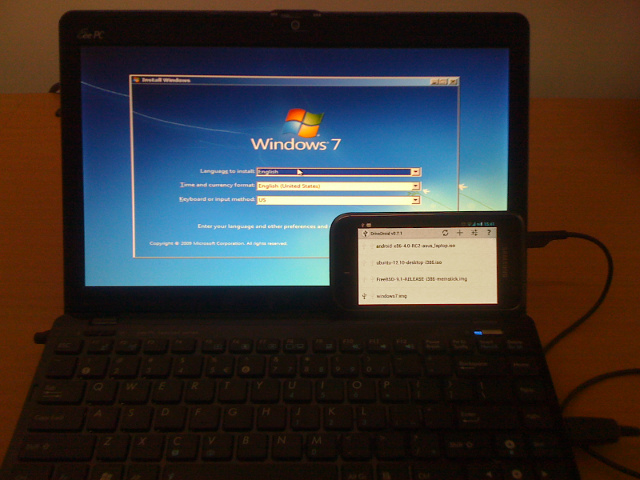
In version v0.7.0 of DriveDroid (Free) and DriveDroid (Paid) a feature has been added to create blank images that look like normal USB disks. This allows you to use tools on your PC to fill the blank USB disk with whatever you want.
In this post I will show how to create a Windows 7 installation disk that can be booted from your phone with DriveDroid. The disk will be made using files of the official Windows 7 ISO.
 Read more...By FrozenCow
DriveDroid 0.7.0 released
Version 0.7.0 of DriveDroid (Free) and DriveDroid (Paid) is just released. This version comes with quite a few changes. Here is the changelog:
- Added 'Create blank image' to create an empty/FAT32 disk-image
- Improved USB Mass Storage option
- Improved support emails
- Option to check for USB Mass Storage
- Changed menu structure for creating/adding/downloading images
- Added support for HTC Sensation, Samsung GT-S5360 and HDC i9300
- Fixed crash when going to preferences without root
By FrozenCowDriveDroid 0.6.2 released
Since the first release of DriveDroid (version 0.5) much has changed. This post summarizes the changes from 0.5 till 0.6.2.
Read more...By FrozenCowDriveDroid 0.5 released!
DriveDroid allows you to boot your PC from ISO/IMG files stored on your phone. This is ideal for trying Linux distributions or always having a rescue-system on the go... without the need to burn CDs or USB pendrives.
DriveDroid also includes a convenient download menu where you can select a popular distibution to download and use.
Read more...By FrozenCowRecovering commits with Git
Git is pretty powerful. With this power it allows you to do amazing things. Recently I've come to realize that you can hurt yourself pretty badly with its powers. Operations like resetting and fast-forwarding are dangarous and should be used with care.
Today I did not handle them with care and commits seemed to be lost. Luckily I found that Git does not delete commits. My lost commits were just not referenced by any branch or tag, but were 'dangling'. The problem is finding these commits back.
I found two possible commands that helped me find my lost commits: git reflog and git fsck --lost-found.
 By Maato
Setting up an infinote server with PAM
Gobby is a multi-user text editor. It allows editing text files by multiple persons, while all of them can see and edit in real-time. It is a great tool for online collaboration, like making todos or even coding a program collaboratively.
Gobby connects to an infinote server. The server keeps track of the different users and documents.
On Ubuntu 10.04 infinoted 0.4.1-1 is already in the repository and it is easy to set up. However, such a setup does not include username and password authentication, an automatic startup using a init-script and a separate user under which the process should run. Authentication using PAM, and thus username and password, is only available since 0.5.0.
This post contains all of the steps required to run infinoted 0.5.0 on Ubuntu 10.04. This includes compiling, creating the user, init-script and configuration necessary to run infinoted in a proper way.
Read more...By FrozenCowWii Device Library v1.2 released
Here is another release of Wii Device Library. This version fixes even more bugs and adds some more stablity. The major changes:
- Balanceboards are now also supported under Windows.
- All stacks are more stable (*).
- Fixed support for Bluez v3.2.1 on x64 machines.
- Fixed some issues for the Windows and Linux GUIs.
(*) You can now (un)plug your bluetooth dongle when running without problems.
You can get the full changelog at Google Code.
The download is available at the project page
Read more...